

Scheduled tasks: my vault works the night shift
10 tasks run automatically to make sure everything is ready when I open my laptop.

This is part 4 of my Robodex series, where I explain how I was finally able to solve my Second Brain frustrations.
Part 1 - How I finally solved my Second Brain frustrations
Part 2 - Growing my second brain one mistake at a time
Part 3 - Leveraging Skills: turning “do that thing again” into a trigger phrase
The first post of this series made a claim about why second brains die: the maintenance nobody asks for accumulates, and eventually the system costs more to keep up than it returns in usefulness. The demand-driven part of a vault is easy to automate — say “save this,” something gets saved. The harder problem is everything that needs to happen regardless of whether you thought to ask: the index rebuild, the crosslink audit, the scan of last week’s security news for things worth tracking. Nobody thinks to schedule those, so they don’t happen, and six months later the vault is stale.
The Robodex has 10 scheduled tasks. I set them up over the first few months of using the system. They now run autonomously.
My scheduled tasks
One runs daily. Four run weekly. Five run monthly.
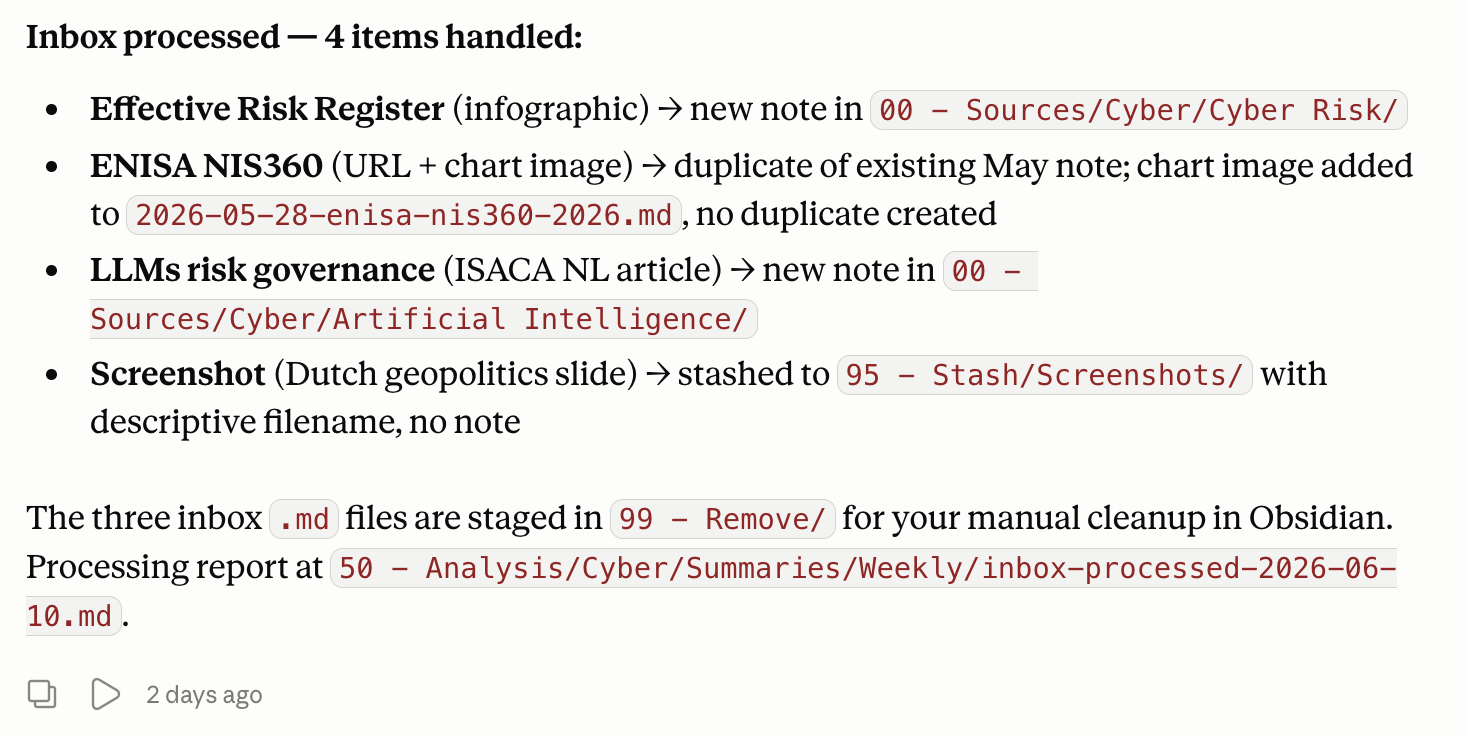
The daily task is daily-inbox-process, at 02:00 every night. It processes whatever landed in 05 - Inbox the day before, routes each note to its final location, rebuilds the Pipeline index, and produces a brief activity summary. The inbox, which is a pile of unrouted notes when left to accumulate, is now a queue that drains itself.
The morning digest note from the daily inbox-process is waiting when I sit down at my desk:
The four weekly tasks:
a glossary update that runs Sunday night and proposes new terms from recent vault content for me to review on monday morning;
a QRC framework review at Sunday that patches topic reference cards in-place when new content warrants it;
a clippings curation task on Friday that organises the Clippings folder into topic subfolders;
The incident radar, which runs Thursday nights and is worth more than a line here, so more details can be found below.
The five monthly tasks:
a vault summary on day 28 of each month covering everything saved that month;
a content ideas batch on day 1 drawn from the prior month’s summary;
a research synthesis on day 29 connecting related themes across sources; (wait, now I know why I missed February)
a vault health check on day 2 that scans for structural drift and fixes it;
a regulatory watch on day 3 covering NL and EU cybersecurity and AI regulation changes.
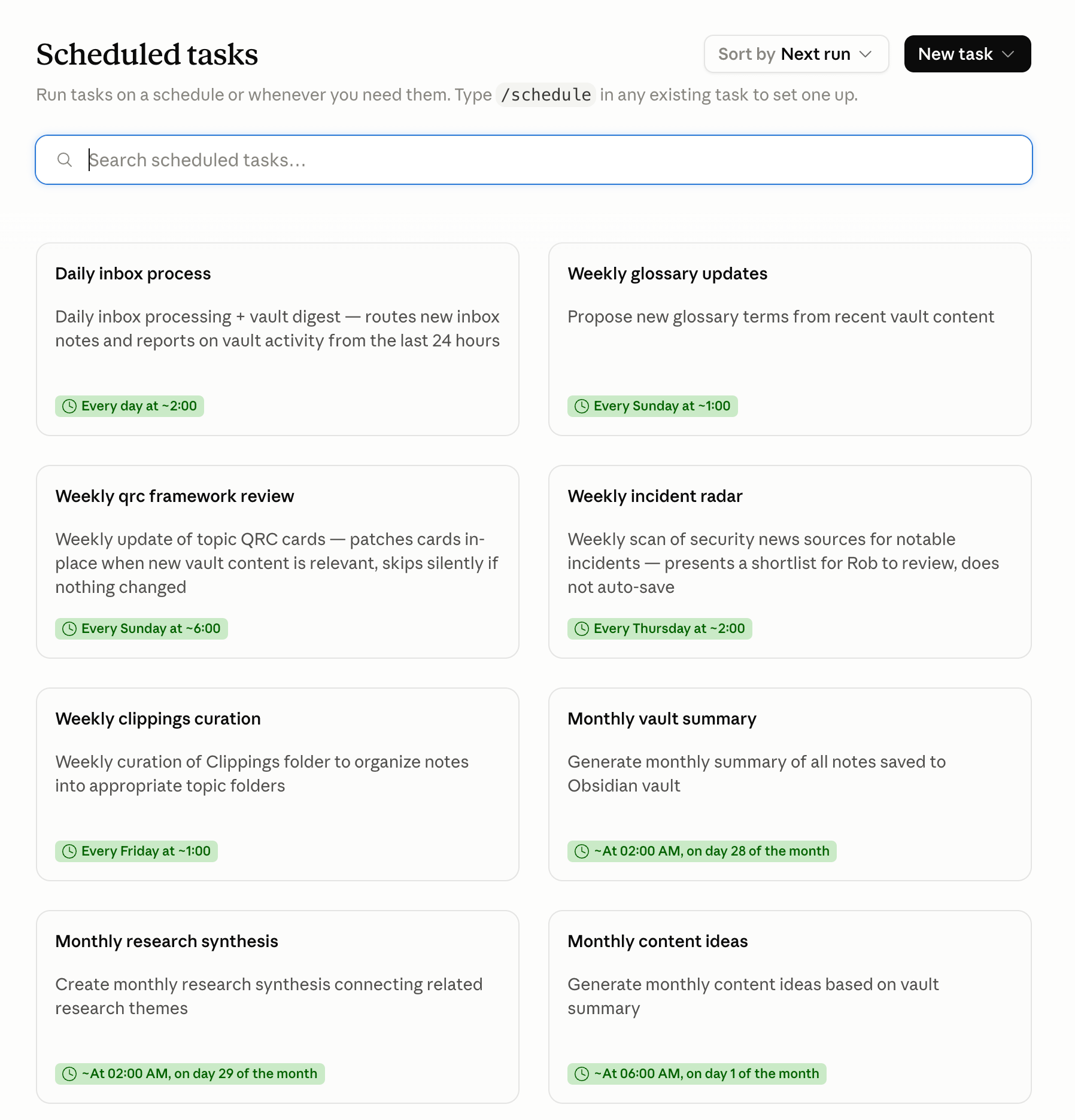
Ten tasks, none needing attention to run. The cumulative effect is a vault that maintains itself: its indexes rebuild, its filing stays current, its reference material stays crosslinked, and its structural health gets audited once a month.
Continuous Improvement
The current configuration is the result of at least one significant correction.
Originally there were two weekly tasks where one daily task now sits: weekly-inbox-process ran once a week, and weekly-vault-digest ran on a separate day. The problem was the batch size. By Friday’s run, the inbox had five days of accumulated notes, and the variety of content over that span was wide enough that the task would occasionally drift from the routing rules on unusual inputs. Small batches were fine. A week of varied content, including anything in an unfamiliar format or on a peripheral topic, produced judgement calls I wouldn’t have made. The solution was daily runs: smaller batches and tighter conformance to the routing logic. The two weekly tasks were retired and their functionality merged into a single daily task. I’ve let it create a seperate task registry note that still lists them, with the retirement date and the reason. That record exists so that future decisions don’t have to reconstruct reasoning that was obvious at the time but will be opaque twelve months later.
Diving into the details
Two tasks from the roster are worth examining in more depth, because they represent two different ways a scheduled task can be useful.
The vault health check runs on day 2 of each month. It scans files changed since the last run, checks frontmatter consistency, catches notes that ended up in the wrong layer, flags orphan files with no crosslinks. When it finds structural drift, it fixes it. When it encounters something ambiguous, it flags it for review rather than resolving it unilaterally. This is an agent auditing its own work, and correcting the drift that accumulates in any system where a human and an AI make filing decisions over an extended period. It is the closest the vault gets to running itself.
The incident radar is different in character. It runs Thursday nights and scans security news sources for notable incidents from the past week. It produces a shortlist of 5 to 8 incidents worth considering, with a brief rationale for each. Then it stops. It writes nothing to the vault. This is a deliberate design choice, and the reason for it is about where automated judgement is actually reliable.
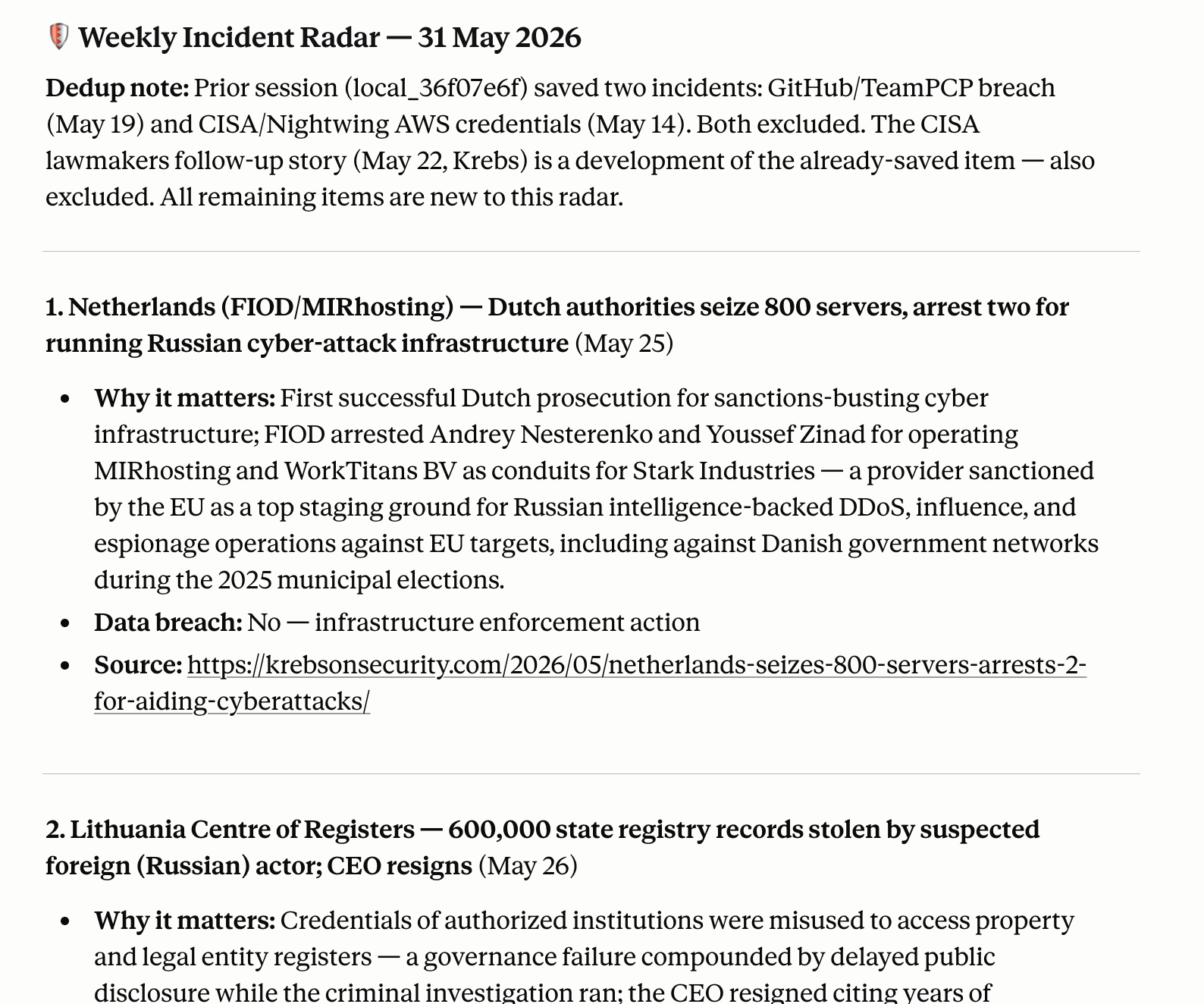
The incident radar is good at finding things that look significant. It is not the right tool to decide whether a given incident is worth adding to a vault that will influence client briefings and public writing. That decision requires context the task doesn’t have: what clients I’m currently advising, what themes I’m tracking, what I already covered last month. The shortlist saves me the scanning work. The human decision saves me from a vault full of low-signal notes the agent thought were important.
It is logical to automate the maintenance, but it is important to keep the judgement for yourself. Maintenance tasks like filing, index rebuilding, folder organisation, crosslink auditing, etc. are predictable and tedious, and the right answer is determinate. Curation tasks, like deciding what’s worth tracking, what’s worth synthesising, what belongs in the vault at all, require assessment of significance. Keep those human. The split is about where human attention actually adds value. For a crosslink audit, it doesn’t. For a list of this week’s incidents worth tracking, it does.
The other pattern worth carrying: task rosters go stale. Schedules that made sense at launch don’t always make sense at month six. Review what you set up periodically. Retire what no longer fits the system you actually have, and record why you retired it for future reference.