

Leveraging Skills: turning "do that thing again" into a trigger phrase
If you've asked an AI the same task twice, you should have written it down the first time.

This is part 3 of my Robodex series, where I explain how I was finally able to solve my Second Brain frustrations.
Part 1 - How I finally solved my Second Brain frustrations
Ask an AI the same task ten times via ad hoc prompts and you get ten slightly different results. This is not a model bug, it is how large language models work. Every variation in how you phrase a request produces variation in what you get back, and those variations compound over time. A notes system’s value comes from structural consistency: notes that follow the same format, carry the same frontmatter fields, get filed in the same way. A vault full of notes with slightly different formats is a vault that is slowly losing coherence, and the cause is not the model but the interface: prompts that change every session.
Skills
In Claude Cowork, a skill is a markdown file with a description and a procedure. The description contains trigger phrases: the specific words that make the agent run the procedure automatically, without further instruction. The procedure is the procedure — every step, every check, every output format, every confirmation required.
The trigger phrases for obsidian-save, as stated in the skill file:
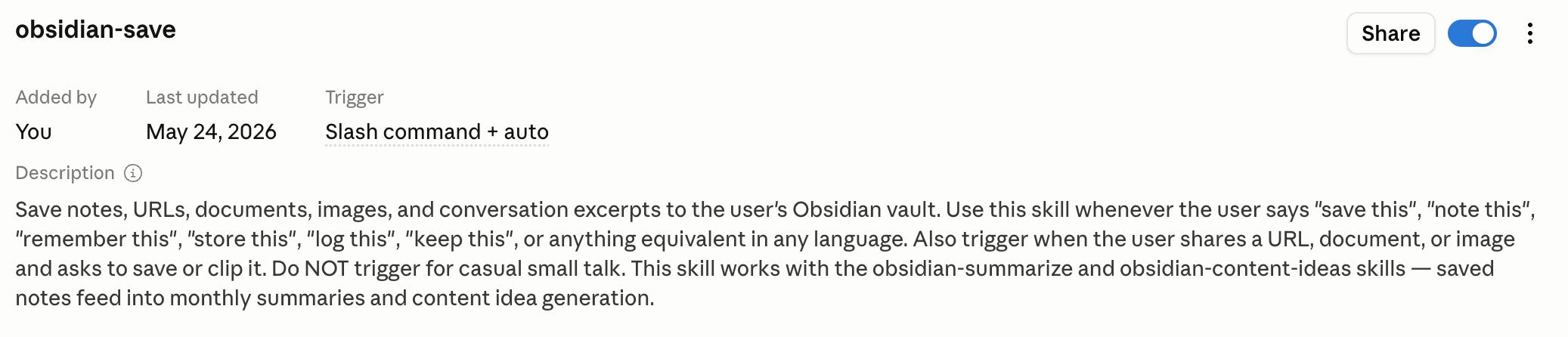
Say any of those and the skill runs. The same procedure, the same steps, the same output format, regardless of how I happened to phrase the request that day. The prompt drift problem disappears because there is no longer a prompt to drift.
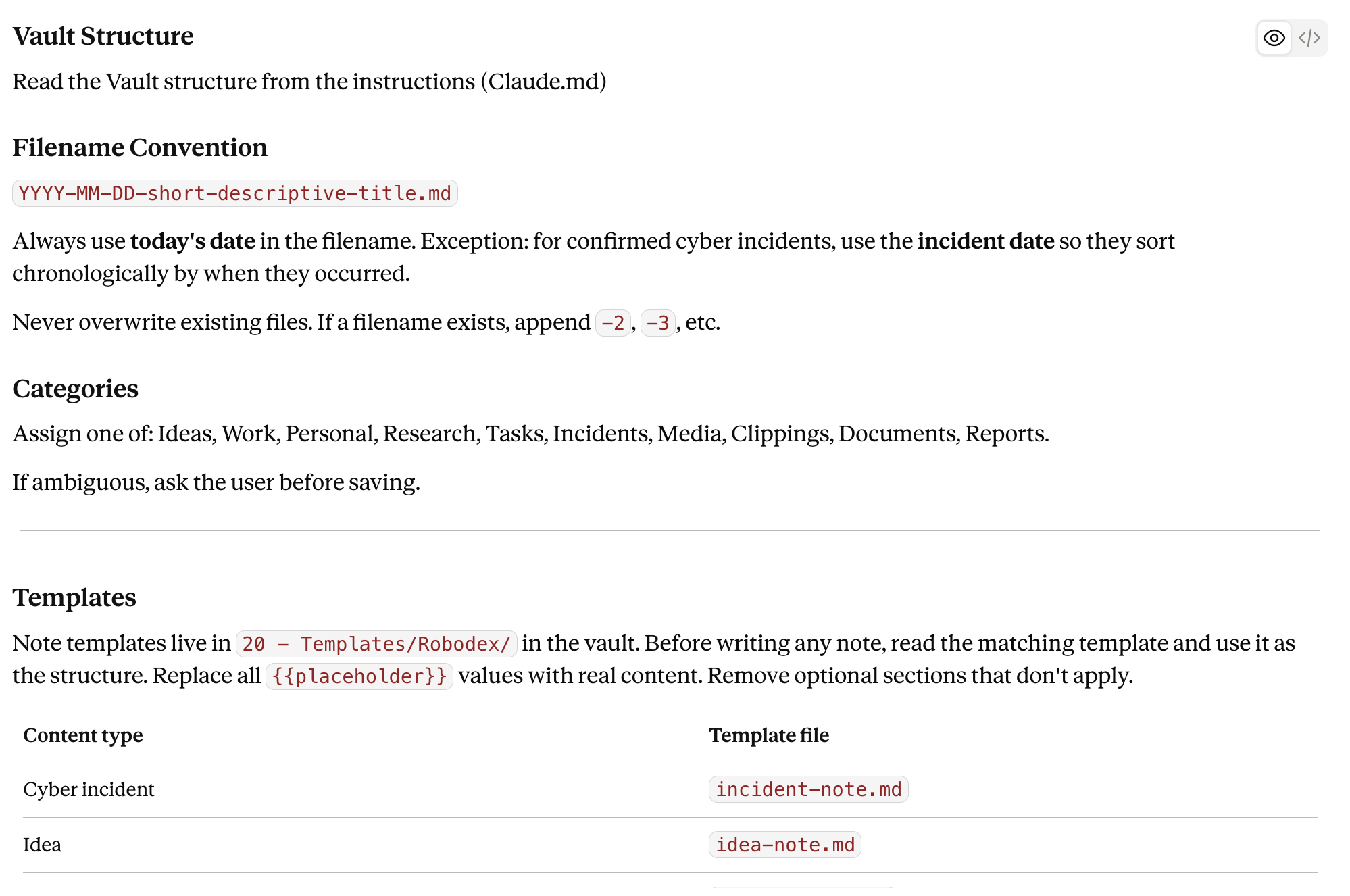
Inside the procedure, the steps are specific to the point of being mechanical: check the content type, find the correct template for that type in 20 - Templates/Robodex/, write the note using that template with no deviations, route it to the correct folder per the layer-routing rules in CLAUDE.md, apply at least two tags, confirm the full filepath. Specific instructions, like exact folder paths, explicit frontmatter requirements, produce consistent output. Vague instructions produce vague output.
The image below shows a small snippet of the skill instructions
The core skills
obsidian-save is the workhorse. Everything I save goes through it: URLs, rough notes, incident reports, research clippings, conversation excerpts. It handles content-type routing (a cyber incident goes to a different folder than a recipe), selects the right frontmatter template for each type, and confirms the filed path. The skill has run hundreds of times, and the structural output is identical each time. That consistency is the point; it is also what makes 547 notes searchable and cross-linkable rather than just 547 files.
obsidian-publication-tracker handles the other end of the pipeline. When I publish something, like this Substack post, or a LinkedIn article, white paper, etc., I say “I published this.” The skill checks whether a matching draft already exists in the Pipeline folder, which it usually does. If found (the common path), it moves the file to 90 - Published/, updates the frontmatter in place with the publication date, platform, and source link, and adds a row to the running publication index. One phrase. One atomic operation. The index stays current without a manual update, and the draft-to-published transition is lossless.
The two skills also interact: obsidian-summarize (monthly summary generation) feeds obsidian-content-ideas (content idea generation). The first skill’s output becomes the second skill’s input. The scheduler triggers both automatically, but the chaining is a skill pattern worth naming: one procedure’s output as another’s input, each with its own trigger phrase and its own contract.
Continuous Improvement
Early on, obsidian-save had no template requirement. I’d written the procedure in prose but hadn’t specified which template to use for which content type, assuming the agent would infer the right choice from context. It would not. The notes it produced were structurally correct but with inconsistent frontmatter: sometimes including fields that belonged to a different content type, sometimes missing required ones. The fix was simple: a lookup table added to the skill file mapping content type to template filename. The agent reads the table before writing any note. The inconsistency stopped in the next session.
This is the same lesson as CLAUDE.md, applied to a different layer. Prose describes intent. Tables enforce it. The distinction holds at every level of the system.
The procedure you’d describe to a human assistant is 90% of a skill. Write: “When I say [trigger phrase], do [steps]. Produce [output]. Confirm [specific thing].” Add edge cases as you encounter them. The iteration is the same as CLAUDE.md: each failure becomes a new line in the procedure.
This approach applies beyond this use-case of knowledge management. A skill for drafting client emails. A skill for formatting incident briefings. If it is repeatable, it can be reproducible, and the cost of writing the procedure down once is paid back with the first session after you stop re-explaining it.